
Metal Detector Threshold Explained: What the Background Hum Tells You
A metal detector threshold is the quiet background tone that some detectors produce while you search. At first it can seem like an unnecessary hum. With practice, however, that baseline helps you notice small changes, recognize when the detector is becoming unstable, and understand when a rejected target has interrupted the audio. It is a listening reference, not a promise of extra depth and not proof that a target is gold.
The meaning of the hum depends on the detector and its active mode. A true threshold can carry subtle variations in the received signal. A reference threshold may be a steady artificial tone that goes silent when the detector sees an identification category you chose to reject. Other detectors can run silently, or switch threshold behavior when sensitivity or audio mode changes. This guide explains those differences, offers a practical tuning method, and uses documented examples from the Minelab MANTICORE, Minelab GPX 6000, and Garrett Goldmaster 24K sold by Orient Detectors.
What is a metal detector threshold?
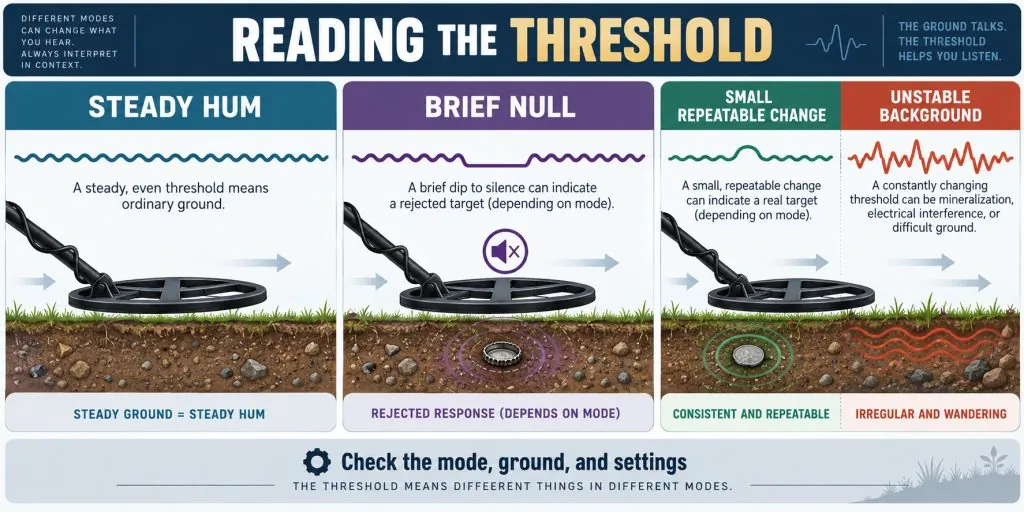
Threshold is the detector’s audible baseline. Imagine drawing a thin horizontal line across a sound graph. Normal background operation sits on that line. A target, ground change, rejected response, or interference may push the sound above it, pull it below it, distort it, or briefly remove it. Because your ear has a reference, a small change can be easier to notice than it would be against complete silence.
The ideal description is usually a faint, steady, comfortable hum. “Faint” matters. If the tone dominates your attention, it can cover the quiet change you want to hear and cause listening fatigue. If it is below your hearing threshold, it provides no usable reference. The useful setting is just audible to the person wearing the detector’s chosen speaker or headphones in the actual environment.
Threshold is not the same as overall volume, sensitivity, or target tone. Overall volume controls how loudly the audio reaches you. Sensitivity affects how strongly the detector responds to incoming signals and noise. Target audio presents a detected response. Threshold level sets the baseline around which some of those changes are heard. Raising all four does not create a simple path to more depth; it can instead make the sound crowded and unstable.
| Control | What it changes | Useful question | Common mistake |
|---|---|---|---|
| Threshold level | Audibility of the background baseline | Can I barely hear it without strain? | Making the hum loud enough to mask weak variation |
| Threshold pitch | Frequency, or high/low character, of the baseline | Which pitch is easiest for my hearing to notice? | Assuming a higher pitch increases detection depth |
| Volume | Listening loudness at the speaker or headphones | Are strong responses comfortable? | Using unsafe loudness to compensate for poor setup |
| Sensitivity | How strongly the system responds to signals and noise | Is operation stable in this ground? | Running at maximum while the background chatters |
| SAT or recovery control | How the audio baseline recovers or how responses separate, depending on model | Does the manual describe this control for my mode? | Copying a value from a different detector |
True threshold and reference threshold are different
The words sound similar, but they describe different audio behavior. A true threshold is responsive: small changes in the detector’s received signal can alter the baseline. In suitable conditions, a tiny or deep target may be noticed as a modest rise, fall, swell, or change in texture rather than a full target beep. Mineralized ground can also affect that baseline, so interpretation depends on repeatability and good ground balance.
A reference threshold is a continuous listening marker used by some discrimination-based modes. It does not necessarily convey every small variation in the same way. Its important job may be to blank, or become silent, when the detector recognizes a target ID that has been rejected. The silence informs you that the detector encountered something even though normal accepted-target audio was withheld.
Minelab documents both types on the MANTICORE. Its Normal, Enhanced, and Depth audio themes use a simplified reference threshold. The Prospecting audio theme uses a true threshold. That makes “turn on threshold” an incomplete instruction: you must know which audio theme is active and what that theme’s threshold represents. The distinction also explains why blanking in a park program should not automatically be interpreted like a subtle variation in Prospecting.
What the background hum may be telling you
A stable hum tells you that the present combination of ground balance, sensitivity, interference, coil movement, and audio settings is manageable. It does not prove the detector is optimally adjusted, but it gives you a baseline from which changes are easier to compare. Check that stability while the coil is moving over representative ground, because a detector can sound calm in the air and react differently to soil.
A gentle, localized rise or fall can deserve investigation. Shorten the sweep, keep the coil height constant, and cross the position from another direction. A response that occurs at the same ground location is more interesting than a random fluctuation that follows no fixed point. Do not require every real target to sound identical. Size, depth, orientation, metal, ground, coil, mode, and settings all influence the response.
A broad rise and fall that tracks a patch of soil may be ground response. Recheck ground balance according to the manual and compare the sound with nearby ground. If the background changes every time the coil height changes, your technique may be adding variation. Keep the coil close and parallel without striking the surface, then test again.
Rapid, irregular chatter across a wide area may indicate electromagnetic interference, excessive sensitivity, or unstable ground response. Stop the coil. If the noise continues while the coil is stationary, interference becomes more plausible. If it appears mainly during movement over the ground, mineralization, hot rocks, ground balance, coil impacts, or cable movement deserve attention. This is a diagnostic comparison, not a perfect EMI test.
A sudden silent gap may be discrimination blanking on a detector using reference threshold. On the MANTICORE, Minelab states that a rejected ID can blank the reference tone. In a site full of rejected trash, frequent blanking can be disruptive; the manual notes that a threshold level of zero may be preferable unless the operator wants to hear those rejected detections. On another model, silence could have a different cause, including threshold being off, low volume, muted headphones, or a connection problem.
| What you hear | Possible explanation | Best next check |
|---|---|---|
| Faint, even hum | Usable baseline in current conditions | Pass a known test target and confirm it remains clear |
| Compact rise, fall, or texture change | Possible weak target or localized ground feature | Repeat from controlled directions at constant coil height |
| Broad wavering over one soil patch | Ground variation, hot rock, or balance issue | Follow the model’s ground-balance procedure |
| Random chatter with coil still | Possible EMI or overly aggressive setting | Run noise cancel or frequency shift before lowering sensitivity |
| Noise mainly while sweeping | Ground response, coil impact, loose cable, or targets | Inspect setup and compare over a clear patch |
| Clean silent gap | Possible rejected-target blanking in a reference-threshold mode | Check discrimination pattern and active audio theme |
Why a louder threshold does not mean greater depth
Turning up threshold makes the baseline louder; it does not increase the strength of the electromagnetic field or move the coil closer to a target. A loud baseline can reduce the contrast between the hum and a slight target variation. Minelab’s MANTICORE manual illustrates this directly: a true threshold that is too low can leave a quiet variation inaudible, while one that is too high can mask the quiet signal. The recommended middle state is a faint audible hum.
Sensitivity has a related trap. Higher sensitivity may make more input audible, but “more” includes ground response and interference. When instability produces continuous false signals, weak repeatable targets can become harder to recognize. The practical aim is useful signal contrast in real ground, not the highest number shown on the control panel.
Depth also cannot be inferred from threshold loudness. Target size, shape, orientation, conductivity, soil, moisture, mineralization, coil selection, mode, sweep technique, and interference all matter. A detector may expose a subtle fringe response through threshold variation, but only a controlled test or recovery can establish what produced it. Avoid turning an audio clue into a depth or identity claim.
Threshold level versus threshold pitch
Level controls how audible the hum is. Pitch changes where the hum sits in the audible frequency range. Pitch is a personal listening adjustment: age, hearing history, tinnitus, headphones, and environmental noise can make one frequency much easier to notice than another. Choose a pitch at which a small change stands out without becoming irritating.
A simple hearing test is more useful than copying another operator. Set a safe overall volume, select a faint threshold, and move the pitch through its available range. At each step, pass a small known target under controlled conditions or use the manufacturer’s recommended test method. Choose the region where the background is comfortable and the change is easiest to distinguish. Then leave pitch alone while adjusting other variables.
Pitch numbers are not universal units across brands. A value of 20 on one detector cannot be compared directly with 20 on another. Even within one detector, headphones can change the perceived balance. Record a preferred value only as part of a complete setup: detector, mode, audio output, coil, site conditions, and relevant firmware.
Model example: MANTICORE true and reference threshold
The Minelab MANTICORE listed by Orient Detectors provides a useful lesson because one detector contains two threshold concepts. According to the current MANTICORE instruction manual, Normal, Enhanced, and Depth themes use reference threshold, while Prospecting uses true threshold.
In a reference-threshold theme, a rejected ID interrupts the hum. This can reveal that the discrimination system encountered a rejected response, but it does not identify the object. Closely spaced rejected and accepted targets can make the audio complex. Recheck from more than one direction and consider the 2D map, numerical ID, ferrous information, and sound together rather than treating a blank as a final dig decision.
In Prospecting, the true threshold is intended to make slight signal changes more apparent in mineralized goldfield conditions. Adjust Threshold Level and volume together so the baseline is faint and strong responses remain comfortable. The manual’s procedure belongs to the Prospecting audio presentation; it should not be presented as proof that reference threshold works the same way.
A practical MANTICORE comparison is to place a representative accepted target and a representative rejected object in a clean training area. In a reference-threshold theme, observe accepted audio and rejected blanking. Then switch to Prospecting only after noting that its target presentation and purpose differ. The exercise teaches the vocabulary; it does not establish a universal sound for gold.
Model example: GPX 6000 threshold and manual sensitivity
The GPX 6000 listed by Orient Detectors is a pulse-induction gold detector with a different workflow. Its official manual says the threshold tone is on by default in Manual sensitivity levels 1 through 10 and off by default in Auto and Auto+. The tone can be toggled, and power cycling returns it to the default for the selected sensitivity range.
Minelab advises using Noise Cancel and Quick-Trak before reducing sensitivity. For manual adjustment, begin low, increase until false signals appear, then reduce enough for false signals to disappear and check again while sweeping over clear ground. The desired result includes small audible variations but should not sound erratic. That last distinction matters: a living threshold can vary slightly without becoming uncontrolled chatter.
If noise occurs while the coil is stationary, the manual directs attention toward EMI during the sensitivity adjustment. If noise appears as the coil sweeps close and parallel to the ground, ground noise is relevant. These comparisons help isolate the problem. They do not guarantee a single cause, so also inspect coil connections, cable security, nearby electronics, and technique.
Do not transfer the GPX 6000 button sequence or sensitivity values to another Minelab. Its defaults and control logic are model-specific. Equally, threshold being off in Auto does not mean the detector is inactive or defective. It reflects the documented audio behavior of that sensitivity range.
Model example: Goldmaster 24K threshold and SAT
The Garrett Goldmaster 24K listed by Orient Detectors is a high-frequency VLF prospecting detector. The Goldmaster 24K manual gives a compact startup sequence: set volume to preference, set threshold to a faint hum, choose sensitivity for smooth operation, and adjust SAT for a stable threshold. It also permits silent search by turning threshold down.
SAT means self-adjusting threshold. On this model, it controls how the threshold recovers as mineralization changes. A recovery setting that is too slow for rapidly changing ground can leave the baseline struggling to return. Faster SAT can improve stability in variable ground, but Garrett warns that it can diminish overall depth. Sweep slowly and use only enough SAT to keep the threshold stable, then compare a known target after adjustment.
Ground balance remains part of the process. The manual’s quick start has the user lower the coil and pump it so XGB can balance or track the mineralized ground. Threshold, sensitivity, SAT, and ground handling work together. If you change several at once, you will not know which change improved or degraded the response.
Garrett also provides Frequency Shift for interference. If the threshold is unstable across the site, address likely EMI and ground causes before simply reducing every control. As with the other examples, a faint stable hum is the listening goal, not a magic numeric recipe.
A repeatable threshold-tuning workflow
- Confirm the active mode. Read the model manual and identify whether the mode uses true threshold, reference threshold, or silent operation. Reset only if you understand what other settings a reset changes.
- Inspect the detector. Seat connectors, secure the coil cable according to the manual, remove loose metal near the coil, and check the coil cover for trapped mineralized material.
- Choose representative ground. Tune where you intend to search, away from an obvious metal target. Air stability alone does not demonstrate ground stability.
- Set safe listening volume. A strong shallow response should be comfortable. Threshold adjustment should never require hazardous headphone volume.
- Perform noise management. Use the documented Noise Cancel, Frequency Shift, or equivalent procedure. Keep other detectors and phones away when comparing settings.
- Ground balance correctly. Follow the exact pumping, tracking, or Quick-Trak procedure for the model and coil.
- Set threshold faintly audible. Raise it only until you can hear the baseline without concentrating hard. Select a comfortable pitch if available.
- Increase sensitivity methodically. Stop before the background becomes erratic. Stability over representative ground matters more than the maximum value.
- Adjust model-specific recovery controls. Use SAT or the relevant control only where the manual assigns that function. Retest a known target afterward.
- Walk a short test lane. Listen for repeatable changes, then recheck them from another direction. Record the setup and conditions.
Troubleshooting an unstable or missing threshold
| Symptom | Controlled check | Possible response |
|---|---|---|
| Threshold chatters with coil stationary | Move away from power sources and other detectors; run documented noise management | Change channel/frequency or reduce sensitivity if needed |
| Threshold changes mainly with coil motion | Sweep a clear patch at constant height after ground balance | Rebalance, inspect cable and coil cover, then tune sensitivity |
| Hum disappears intermittently | Check whether active mode uses rejected-ID blanking | Review discrimination or set reference threshold to zero if the manual recommends it for trash |
| No threshold at startup | Check mode defaults, threshold level, volume, and audio connection | Use the model’s toggle or level control; test speaker and headphones separately |
| Weak test target vanishes after tuning | Repeat with the same coil path and height | Revisit threshold, sensitivity, ground balance, and recovery one at a time |
| Hum causes fatigue | Check level, pitch, headphone fit, and session length | Lower the baseline, choose a comfortable pitch, or use documented silent search |
Make one adjustment at a time and retest the same known object. If you change sensitivity, ground balance, threshold, pitch, SAT, and discrimination together, a quieter machine may merely be a less responsive one. A controlled comparison preserves the response you care about while removing noise.
Headphones, hearing, and fatigue
Headphones can make a faint baseline and small changes easier to hear by reducing environmental masking. They also make excessive volume more dangerous because the sound is delivered close to the ear. Begin low, test a strong target, and leave enough headroom that an unexpected shallow object is not painful. Follow the headphone and detector manufacturers’ safety guidance.
Low-latency audio matters when sound must align with coil position. A noticeable delay can make a compact target seem displaced from where the coil crossed it. Use the wired or approved low-latency wireless options documented for the detector. Ordinary Bluetooth accessories may introduce delay even if they pair successfully.
Hearing varies. An operator who cannot comfortably hear a chosen threshold pitch should select another pitch where the detector permits, use suitable headphones, or choose a documented silent-search presentation. There is no benefit in forcing an irritating tone for hours. Fatigue reduces attention and can make small changes less, rather than more, noticeable.
Three field exercises that teach threshold language
1. Stable baseline exercise
Choose a clear training patch and complete the model’s noise and ground procedures. Set a faint threshold and walk a straight ten-metre lane with consistent coil height. Mark any change, then repeat the same lane in reverse. Changes that move around are likely environmental or technique-related; changes fixed to a small location deserve closer investigation.
2. Known-target contrast exercise
Use a legal, clean test area and a representative object. Keep target position, coil, mode, sweep height, and speed constant. Compare threshold just below audibility, faintly audible, and noticeably loud. The point is to find where the weak response has the clearest contrast, not to declare one setting universally deepest.
3. Blanking exercise
On a detector and mode documented to use reference-threshold blanking, place one accepted object and one object whose ID is rejected. Listen separately, then position them closer together. Observe the accepted response, silent gap, and mixed behavior from several angles. This builds recognition while demonstrating why blanking indicates classification, not certain object identity.
Frequently asked questions
1. Should a metal detector threshold always be audible?
No. Some modes are designed for silent search, and some detectors default threshold off in particular settings. The GPX 6000, for example, defaults it on in Manual sensitivity and off in Auto and Auto+. Follow the active model and mode.
2. Does raising threshold increase detection depth?
No. It raises the audible baseline. A setting that is too loud can mask a weak variation. Detection performance depends on the complete detector, coil, mode, ground, target, interference, and technique.
3. What should the hum sound like?
Where true threshold is used, manufacturers commonly describe a faint audible hum. It should be comfortable and stable enough that small changes stand out. Some variation may be normal; uncontrolled chatter is not the target.
4. Why does the threshold go silent over some objects?
In a reference-threshold mode, the detector may blank the hum over a rejected ID. MANTICORE documents this behavior. On other setups, check mode, audio level, headphones, and connections before assuming blanking.
5. Is every threshold wobble a deep target?
No. Ground changes, hot rocks, EMI, coil impact, cable movement, sensitivity, and technique can all alter the sound. A useful clue repeats at the same place under controlled sweeps.
6. Should I maximize sensitivity until the threshold is busy?
No. Use the highest setting that remains usefully stable according to the manual. Constant false signals can mask the small repeatable response you are trying to hear.
7. Are threshold pitch and level the same?
No. Level changes audibility; pitch changes the tone’s frequency. Choose a pitch your hearing distinguishes comfortably, then set the level faintly audible if the mode calls for it.
8. Can I copy a threshold setting from another user?
It can be a starting point only on the same model and mode. Hearing, headphones, ground, coil, interference, firmware, and sensitivity all affect the result. Tune at the site.
9. Why is my GPX 6000 quiet in Auto?
Minelab documents threshold off by default in Auto and Auto+ and on by default in Manual levels. It can be toggled. Quiet operation in Auto therefore may be normal rather than a fault.
10. What does SAT do on the Goldmaster 24K?
It adjusts how the threshold recovers as mineralization changes. Garrett’s startup procedure pairs SAT adjustment with ground balance, a faint threshold, and sensitivity set for smooth operation. Retest known targets after changing it.
Final takeaway
A threshold is most useful when it gives your ear a quiet reference without dominating the search. Learn whether your mode supplies a responsive true threshold, a blanking reference threshold, or silent operation. Then tune the detector in representative ground, address interference and balance first, keep the hum faint, and investigate changes that repeat at a fixed location.
The three device examples show why instructions must remain model-specific. MANTICORE changes threshold type with its audio theme. GPX 6000 changes its default threshold state between Manual and automatic sensitivity. Goldmaster 24K combines a faint hum with SAT and ground handling. Understanding those relationships is more productive than chasing a universal number or assuming that louder audio means more depth.