Gold Legend G2 Guide: 5 Systems, Complete Setup and Price
Use this Gold Legend G2 Guide to explore Geoground’s five-system platform and prepare for your next field session. Five integrated systems bring long-range locating, manual frequency entry, reference-sample operation, ionic response monitoring and approximate depth estimation into one platform. Choose the approach that fits your search, adjust the settings and build a field routine around the information you want to investigate.
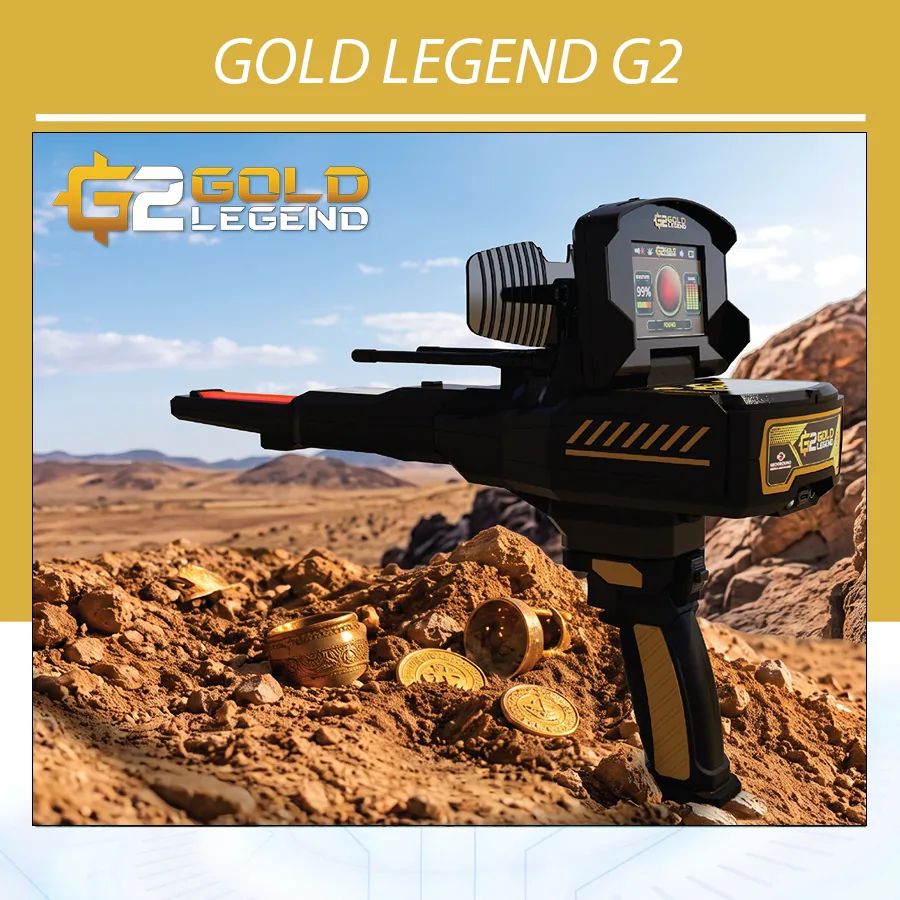
Gold Legend G2 puts configuration within reach through a color display, keypad controls and a wireless handle. Select a target profile, choose the soil setting and review the distance and depth parameters before you begin. As your search develops, use the other systems to add observations and examine the area in more detail.
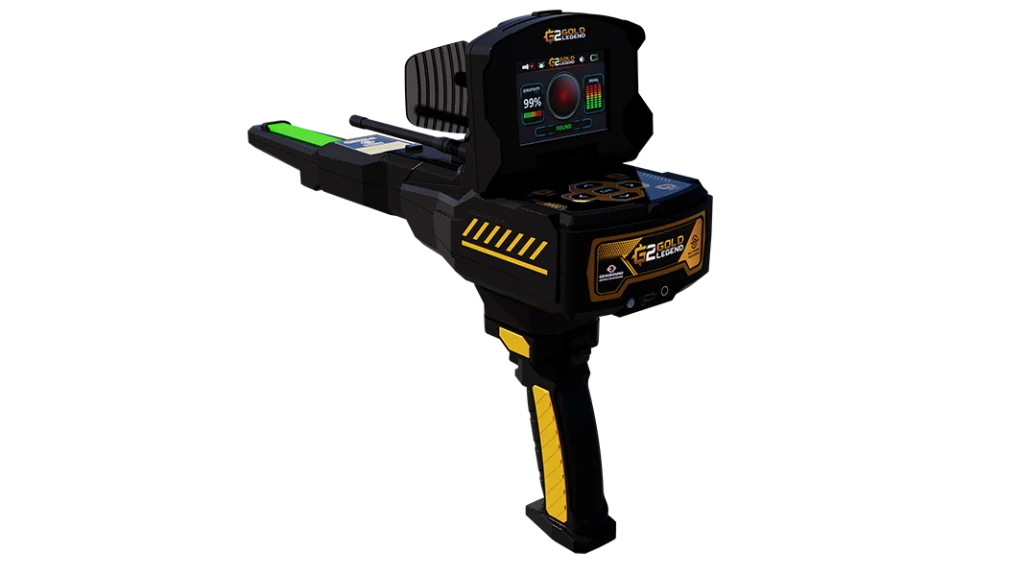
Explore the Gold Legend product page at Orient Detectors and contact our team for the G2 configuration, current pricing, package contents and training options. The Gold Legend G2 Guide covers technology, operation, specifications, accessories and buying questions for your first session.
Explore the official Geoground Gold Legend G2 systems overview alongside the configuration details below.
What is Gold Legend G2?
Gold Legend G2 is a dedicated long-range exploration device with five selectable search systems. Its central purpose is to give the operator control over search preparation and directional investigation, supported by complementary response displays and a depth-estimation function. It is suited to prospectors and treasure hunters who want to learn a structured locating workflow.
Start with the type of work you plan to do. You may want to investigate a broad outdoor area, follow a directional response, compare observations from different approaches or estimate depth around a marked center. These are distinct stages, and selecting the right mode helps keep each session purposeful.
Gold Legend G2 Guide to the Five Search Systems
| System | Main function | Controls and feedback |
|---|---|---|
| Long-Range Locator | Directional searching with preset profiles | Target, soil, distance, depth and balance indicator |
| Free Mode | Long-range-style operation with manual frequency entry | Frequency, soil, distance and depth settings |
| Bionic | Search preparation using a physical reference sample | Sample recording, sensitivity and visual/audio feedback |
| Ionic | Monitoring changes on a dedicated response scale | Numerical scale and red/blue indications |
| Smart Depth | Approximate depth assessment around a marked area | Guided measurement sequence and calculated result |
Use the Gold Legend G2 Guide system comparison to choose the function that fits your next task. Long-Range Locator organizes the initial settings; Free Mode gives experienced users manual frequency control; Bionic and Ionic offer different operating displays; and Smart Depth adds an approximate depth calculation after an area has been identified.
Long-Range Locator: configure the search before you move
The long-range section of this Gold Legend G2 Guide starts with four settings: target type, soil type, search distance and depth. Navigate between the categories with the keypad, select your values and review the configuration overview before entering the search screen. This preparation gives your session a defined starting point.
Hold the device horizontally and complete calibration using the on-screen prompt and the keypad or wireless handle controls. The balance indicator helps you maintain the required position during searching. Keep the device level and allow yourself time to settle into a steady grip before moving through the area.
For an initial search without a directional response, use the zigzag approach taught during training. When a response develops, follow the operating procedure to mark the area and approach it again from other directions. Move slowly enough to connect the observation with a position on the ground.
Eleven target profiles
Select from Gold Ore, Gold Treasure, Gold Veins, Silver, Platinum, Bronze, Cavity / Void, Copper, Diamond, Gemstone and Iron. These choices configure the intended search profile and give you a starting point for different search objectives.
Use the selected profile as an operating setting. Establishing the composition of a buried object requires further verification; a menu label or directional response alone does not identify its material. Keep the profile and field observations recorded together so later comparisons remain meaningful.
Eleven soil selections
Choose Low Mineral, High Mineral, Gravel, Forest, Saline, Volcanic, Sandy, Rocky, Wet, Dry or Normal. Match your choice to the site with guidance from your trainer, then record it alongside the other parameters.
Adjust settings deliberately. Increasing distance or depth is an operating choice, not an automatic improvement. Begin with a configuration you can explain and repeat, then assess changes one at a time while maintaining the same handling and route.
Free Mode: put manual frequency control in your hands
Free Mode extends the configurable approach by replacing preset target selection with a manually entered frequency. Soil, distance and depth remain part of the setup, giving experienced operators a way to prepare a custom search configuration within the long-range workflow.
Fit the accessories required for the mode, set the handle lock to the position specified for searching and complete the preparation sequence. Enter your frequency, review the remaining settings and use the same careful approach to balance and movement that you practise with Long-Range Locator.
During training, practise entering and editing frequency values on your unit. Maintain a simple session log: selected frequency, soil, distance, depth, route and observed response. Change one parameter at a time so the effect of an adjustment can be assessed.
Bionic: prepare your search with a reference sample
Bionic introduces a sample-based preparation method. Secure the sensor and handle, set the handle lock as required, and direct the sensor toward the sample object. Use the laser pointer for alignment and press Start to record the reference before completing calibration.
The search display combines a circular activity animation, signal-strength information and adjustable sensitivity. Set sensitivity from 1 to 10, then follow the visual and audible feedback while maintaining consistent handling. For the sample workflow in this Gold Legend G2 Guide, retain your sensitivity settings and reference details for comparison.
When changing to a different sample type, exit and re-enter the system to repeat sample capture and calibration. Practise the complete sequence before heading to a new site, including how to hold the sensor and how to recognize the operating state shown on the screen.
The circular animation represents searching activity rather than a map of buried objects. Sample-based feedback is an observation to investigate, not independent confirmation that an underground object matches the sample material. Use repeat checks and suitable verification when assessing the area.
Ionic: follow changing responses on a dedicated scale
Ionic provides an indicator scale from 0 to 255, with a neutral midpoint at 128. The interface uses red-side indications for potential metallic-target responses and blue-side indications for possible cavities. This keeps changes visible as you work through the area.
Begin calibration outside the intended search area, facing away from the direction you plan to investigate. Follow the system sequence, then move the device slowly up and down with a slight tilt toward the ground. Maintain a steady speed so you can relate a displayed change to your movement and position.
The repeat-check method in this Gold Legend G2 Guide is straightforward: mark a location and repeat the same approach. Compare the direction and extent of the displayed response while keeping the settings consistent. The number and color are response indicators; they do not measure gold purity, target weight or a confirmed cavity size.
Smart Depth: add an approximate depth assessment
Once you have marked an area of interest, Smart Depth adds a guided measurement stage. Begin at the selected center, balance the device horizontally and follow the on-screen sequence for recording the required paths and steps. Return to the center at the indicated points and complete the calculation.
Learn the exact sequence for the software installed on your unit during training. Practise the starting position, direction changes, Start-button timing and return points as one complete exercise. Clear center marking and consistent step recording help you repeat the procedure without confusing one session with another.
Review the calculated result alongside your other observations. Smart Depth provides an estimate, and its usefulness depends on careful operation and the conditions of the investigation. If repeated values differ, check the center, path and recording method before making another measurement.
Depth and range: understand the operating figures
Gold Legend G2 has manufacturer-stated maximum figures of up to 40 m depth and up to 3000 m front range in its Long-Range Locator description. These figures apply to that search context and are not guaranteed detection results. Target characteristics, soil, interference, calibration and technique affect field responses.
Front range describes a different dimension from vertical depth. Review the two settings separately during your demonstration and ask how the proposed setup fits your intended search area. A selected depth value is a configuration, while a Smart Depth result is an approximate calculation obtained through its own procedure.
Gold Legend G2 Guide: Technical Specifications
| Item | Specification |
|---|---|
| Brand and product | Geoground Gold Legend G2 |
| Search systems | Long-Range Locator, Free Mode, Bionic, Ionic, Smart Depth |
| Target and soil profiles | 11 target selections; 11 soil selections |
| Bionic sensitivity | Adjustable from 1 to 10 |
| Ionic scale | 0–255; neutral midpoint 128 |
| Display | 3.5-inch TFT LCD HMI with LED backlight |
| Resolution | 480 × 320 pixels |
| Display colors | 65,536 |
| Memory | SD, 2 GB |
| Audio | Internal speaker and 3.5 mm headset output |
| Internal speaker | 2 ohms / 3 W |
| Main-unit battery | Three lithium-ion cells, 2000 mAh per cell |
| Wireless-handle battery | Internal flat lithium-polymer battery |
| Removable batteries | No |
| Charger input | 100–220 V AC, 50/60 Hz |
| Charger output | 5 V / 2.5 A |
| Charging connections | USB-C; main unit and handle charged separately |
| Additional features | LED illumination, laser pointer and vibration |
| Operating temperature | 0–40 °C |
| Storage temperature | −20–60 °C |
| Package dimensions | 430 × 380 × 160 mm |
| Package weight | 3750 g for the package |
| Interface languages | English, German, Spanish, French, Russian, Italian, Arabic, Farsi |
Display, controls and language settings
The 3.5-inch color display keeps selected settings and operating feedback in view. Use the keypad to move between menus and the wireless handle’s Start control for the actions required by the selected system. Practise both controls until the sequence feels familiar before extending your search route.
Adjust brightness to suit outdoor visibility and set volume for the feedback you want to hear. Sensor illumination can be switched on or off through the settings. The status bar provides battery and audio information, while the device-information screen gives access to model, serial number and software details for support.
Choose from eight interface languages, including English and Arabic. Learning the menu in your preferred language helps you identify each parameter and follow prompts during calibration. Keep a record of the serial number and software version with your purchase documents for future service enquiries.
Gold Legend G2 Guide to Assembly and First-Time Setup
Power off the equipment and disconnect it from charging before assembly. Seat the GEO Matrix Sensor securely in its socket, align the wireless handle correctly and fit the antennas and Signal Booster Dish as required for the selected mode. Tighten components carefully and check that connections are secure without forcing them.
Charge the main unit and wireless handle separately through their USB-C connections. Charging indicators are red while charging and turn blue when full. Allow at least six hours for the initial charge according to the operating instructions; review subsequent charging and runtime requirements during handover.
For practice, choose an open outdoor area away from nearby equipment and carried metal. Keep another detector or electromagnetic device at least 10 m away. Review your settings and complete calibration before investigating a location. Give yourself room to learn handling without rushing through the exercise.
How to Use Gold Legend G2: A Practical Field Routine
- Define the purpose of the session and choose a location where you have permission to work.
- Check the main unit, handle charge and external connections, then fit the accessories required by your chosen system.
- Select the interface language, brightness and audio levels that let you follow the prompts comfortably.
- Choose Long-Range Locator, Free, Bionic or Ionic according to the intended procedure, and enter the relevant settings.
- Calibrate and maintain the sensor or device position required for that mode.
- Move steadily, mark locations of interest and record your settings and approach direction.
- Revisit the marked area from the required approaches and compare repeat observations.
- Use Smart Depth when appropriate, following the sequence demonstrated for your software, and retain the result as an estimate.
- Record what you learned, then protect and recharge the equipment for the next session.
Keep a compact search log with this Gold Legend G2 Guide to carry useful experience between outings. Include the date, location, selected mode, settings and a sketch of the route. Add any change in handling or environmental conditions so a later comparison has context.
Common operating issues and useful checks
| Observation | First check |
|---|---|
| Sensor warning appears | Check that the sensor is correctly attached and seated |
| Critical battery warning | Charge the relevant component before continuing |
| Main unit is charged but handle is not ready | Check the handle’s separate USB-C charging connection |
| Difficulty maintaining direction or balance | Review grip, horizontal position and calibration |
| Responses change between passes | Repeat the route with the same settings and steadier movement |
| Smart Depth estimates vary | Check the marked center, paths and step recording |
| Audio is too low | Review volume settings and headset connection |
Care for the equipment between sessions. Protect it from impacts, excessive humidity and temperatures outside its specified limits. Do not immerse the device or accessories. For a recurring fault, provide support with the alert message, software details and operating conditions, and arrange authorized service when required.
Gold Legend G2 package and accessories
Review a kit covering the main unit, GEO Matrix Sensor, wireless handle, search antennas, Signal Booster Dish, charger, charging cable, user manual and warranty card. Confirm final quantities and supplied components in the written offer, and ask to see the assembled configuration during training.
Check that the handover includes charging both rechargeable components, selecting the required handle-lock position and configuring the modes you plan to use. The presence of a sensor or SD memory does not turn this five-system workflow into an Android 3D scanning package. Choose equipment according to the actual functions required for your work.
Gold Legend G2 Guide: Price and Buying Considerations
For the Gold Legend G2 price, request a current quotation from Orient Detectors. State the product name, delivery country and accessories you need so the team can confirm the configuration and total cost. A model-specific offer makes it easier to compare equipment, training and delivery together.
Review the currency, quotation validity, payment terms and final package contents. Check Orient’s buying and shipping guidance when discussing delivery. Confirm whether shipping, insurance, import charges and taxes are included or payable separately. Availability and dispatch timing should be stated for the order you are placing.
Include after-sales service in your comparison. Ask about training language and format, warranty duration and coverage, service arrangements and the support available for operating questions. Keep the written quotation and warranty information with your device records.
Questions to ask during a demonstration
Ask to navigate the five-system menu, select a target and soil profile, complete horizontal calibration and read the balance indicator. Try manual frequency entry, reference-sample recording and the Ionic display. For Smart Depth, request the full measurement sequence rather than only the final screen.
Frequently asked questions
Who is this Gold Legend G2 Guide for?
This Gold Legend G2 Guide is for buyers and operators learning the five-system workflow: Long-Range Locator, Free Mode, Bionic, Ionic and Smart Depth.
Can I select gold, silver or cavities in the menu?
Yes. The target menu includes gold-related profiles, silver and Cavity / Void among eleven selections. These configure the search profile; confirming the material or structure requires further investigation.
What is the difference between Free Mode and Long-Range Locator?
Long-Range Locator uses preset target selection. Free Mode lets you enter a frequency manually while retaining soil, distance and depth settings within a similar operating approach.
Does Bionic need a reference sample?
The sample-based operating sequence begins by aiming at a physical reference, recording it and completing calibration. Training should cover sample alignment, sensitivity and how to repeat the preparation when changing sample type.
Does the radar-style animation show exact target coordinates?
No. It indicates searching activity. Use the operating feedback and marked site observations for further examination; the animation is not a georeferenced map.
Does a red Ionic response mean gold?
Red represents a potential metallic-target response in that interface. It does not independently identify gold or measure purity, weight or value.
Does Gold Legend G2 provide 3D ground scanning?
Its five systems focus on long-range locating and complementary response and depth tools. If 3D ground-data analysis is essential to your work, discuss a detector with that specific capability before choosing your package.
Is a phone required for the five-system workflow?
The operating sequence covered here uses the device display, keypad and wireless handle. It is not built around a separate Android analysis application.
Is the depth result exact?
Smart Depth calculates an approximate result based on the measurement procedure. Follow the training sequence for your unit and review the result alongside repeat site observations.
What should I confirm about battery life and warranty?
Request operating-time information for your preferred modes and written warranty details for the offered unit. The main unit and handle require separate charging, and the initial charging recommendation is not a runtime specification.
Start your next search with Gold Legend G2
Use the Gold Legend G2 Guide as a reference while practising the five systems and preparing your equipment. Gold Legend G2 gives you a platform for learning a structured locating routine, following responses and adding approximate depth information to your assessment.
Visit the Gold Legend product page at Orient Detectors, speak with our team about G2 pricing and training, and review our buying and shipping information. Choose a specified package and prepare for your first session with practical support.