Why Start in All Metals Mode?
Filtering can be useful in a cluttered location, but filtering also changes what you hear. Gold Stinger X6 All Metals mode provides a broader first look at the site because the manual describes it as detecting ferrous and non-ferrous metals. In an unfamiliar field, it can help an operator locate response-dense areas, investigate an unusual signal and learn how the soil affects the detector before using Discrimination or Iron Remove as a comparison.
| Question | All Metals approach | Filtered approach |
|---|---|---|
| What can respond? | Ferrous and non-ferrous metal responses are included | Some responses may be reduced according to a filter |
| Best early use | Learn the site and locate repeatable signals | Compare a target after an initial response |
| Main risk | More clutter can require slower investigation | A desirable response near iron may change or be less obvious |
| Good habit | Confirm from several directions | Toggle back to All Metals for a second opinion |
What the Screen Shows
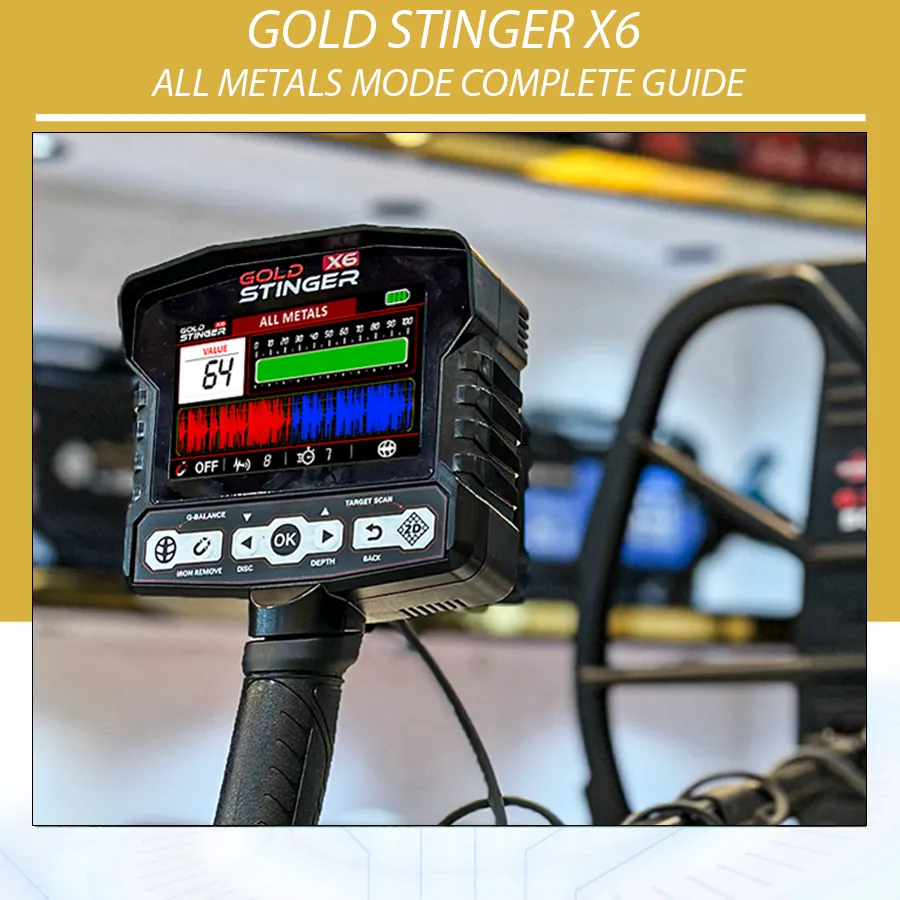
According to the manual, the All Metals interface includes a value, a value bar and a linear graph. It states that a red graph indicates metal and a blue graph indicates a cavity or hollow response. These labels describe the device’s displayed interpretation; they do not prove that a particular object, room, tunnel or metal type is present. Natural mineral variation, target geometry and nearby material can affect a graphical response.
| Display element | What it contributes | What it does not establish alone |
|---|---|---|
| Numeric value | A repeatable reference for comparing the same response | Exact material identity |
| Value bar | Relative visual change during controlled sweeps | Guaranteed target size or depth |
| Linear graph | Pattern that can be compared across directions | Proof of a buried object’s shape |
| Red graph | Manual’s metal indication | Whether metal is valuable, pure or recoverable |
| Blue graph | Manual’s cavity or hollow indication | Proof of a void or its dimensions |
Set Up Before Your First Sweep
Start with the coil connected, cable secured and shaft adjusted so you can keep the coil close to and parallel with the ground. Power on, confirm coil connectivity in the status bar and complete Ground Balance on quiet soil. Begin with Sensitivity and Turbo at settings that remain stable at the site. A lower stable setting often produces more useful target comparisons than an aggressive setting that chatters continuously.
- Select All Metals after completing Ground Balance.
- Choose a clear, permitted patch and make several slow sweeps to hear the background.
- Keep the coil height consistent and overlap each arc slightly.
- When a response appears, reduce sweep speed and mark the strongest repeatable area.
- Cross-sweep the position at roughly 90 degrees.
- Check the value, bar and graph only while repeating the same controlled motion.
- Use Pin Pointer, Target Scan or Discrimination as separate confirmation tools when appropriate.
Sweep Technique That Makes the Data Useful
All Metals mode rewards disciplined technique. Sweep too quickly and a small or masked response may be missed; sweep with a changing coil height and response strength may rise and fall simply because the coil moved farther from the ground. Keep the coil level at the ends of each pass rather than lifting it in an arc. Overlap passes so that ground between sweeps is not skipped.
When you hear a possible target, do not immediately chase the display. First repeat the sound at the same pace and height. Mark its centre, sweep across it from another direction, and note whether the response remains in approximately the same place. A response that only happens once, only at the end of the swing or only when the cable moves is less dependable than one that repeats under controlled conditions.
| What happens | Likely effect | Correction |
|---|---|---|
| Coil rises at each swing end | Inconsistent strength and graph | Keep coil parallel and move your body, not only your wrist |
| Fast passes over clutter | Mixed responses blur together | Slow down and shorten the sweep window |
| No overlap | Gaps in ground coverage | Overlap each pass by a small, consistent amount |
| Changing settings while checking a signal | Cannot tell why result changed | Alter one setting, then rescan identically |
| Reading display during coil lift | Distance change looks like target change | Compare only level, repeatable passes |
Red and Blue Graphs: A Careful Interpretation
The red/blue system can be helpful as an observation, not a conclusion. A red graph is the manual’s metal indication and deserves a controlled rescan. A blue graph is described as a cavity or hollow indication, but should be treated as a reason to investigate conditions rather than a statement that a void exists. Use the same position, sweep direction and coil height to see whether the pattern repeats. Then move away, rebalance if the ground changes and return for another comparison.
Never use a color alone to make a claim about archaeological objects, buried structures or material value. If a site has legal, historical or safety significance, do not excavate or disturb it; seek the required landowner and local authority guidance. A metal detector screen cannot replace professional survey methods.
Confirming a Response
| Step | Purpose | What to record |
|---|---|---|
| Repeat in the original direction | Check that the response is not random noise | Audio, value and approximate centre |
| Cross-sweep | Check response from another angle | Whether centre and graph remain similar |
| Check coil height and cable | Remove technique-related causes | Whether signal survives controlled height |
| Use Pin Pointer | Narrow a repeatable metal response | Smallest consistent location |
| Compare Discrimination/Iron Remove | Learn whether filtering changes the response | Difference, not a final target label |
| Use Target Scan if appropriate | Run the device’s guided scan process | Repeatability across scans |
Choosing GS30 or GS50 for All Metals
The Gold Stinger X6 package includes two coils. The smaller GS30 is intended for better maneuverability and enhanced sensitivity to small targets in tighter or cluttered spaces. The larger GS50 is intended for wider coverage and deeper-target searching in open areas. The better coil is the one that allows controlled, repeatable sweeps for the actual ground. After every coil change, verify connectivity and perform Ground Balance again.
All Metals, Sensitivity, Turbo and Iron Remove
Sensitivity and Turbo can make the detector react more strongly, but a response is only useful when it stays repeatable. Raise Sensitivity gradually after balancing; test Turbo separately. The Iron Remove shortcut can be used as a comparison in iron-contaminated ground, but do not leave it on without checking how it changes a doubtful signal. A non-ferrous target next to iron can behave differently from an isolated target.
Use a field notebook. For every noteworthy signal, write the coil, Ground Balance outcome, Sensitivity, Turbo, Iron Remove state, soil condition and whether the signal repeated from two directions. This is more valuable than expecting one number or graph color to provide an answer.
Common Problems in All Metals Mode
| Problem | Possible cause | Action |
|---|---|---|
| Constant random responses | Mineralization, interference or high settings | Rebalance, inspect cable and reduce settings |
| Response only at sweep edge | Coil lift or cable movement | Level the coil and repeat slowly |
| Graph changes every pass | Inconsistent speed/height or variable ground | Shorten sweep, stabilize technique and retest |
| Target disappears with Iron Remove | Filtering changed a mixed response | Return to All Metals and cross-sweep |
| Blue graph is seen once | Ground variation or transient response | Do not conclude; rebalance and compare carefully |
Build an All Metals Test Garden
A small permitted test garden gives a better learning environment than guessing from random field responses. Mark each location clearly and keep targets separated. Include an iron object, a non-ferrous household item and an empty control location. Do not bury objects where recovery is prohibited, and do not use the results to claim universal depth or identification performance. The value of the test is repeatability: you know where the item is, can repeat the sweep at the same speed and compare how settings change the response.
Run the test after Ground Balance with the same coil and coil height. Start in All Metals with stable settings. Make notes on the audio, value, bar and graph from two directions. Then make only one change: switch coils, adjust Sensitivity slightly, or compare Iron Remove. Return to the original configuration before making the next comparison. This practice teaches the difference between a target response and a change created by technique or settings.
Working in Iron-Contaminated Ground
Iron-rich ground can produce many responses in All Metals. That is useful information, but it requires a slower method. Shorten the sweep, overlap passes and use the smaller GS30 coil when maneuverability and separation are more useful than broad coverage. Mark a repeatable response before toggling Iron Remove or entering Discrimination. Then return to All Metals and sweep again; the comparison is more meaningful when the original response is still available.
Do not assume that a mixed or changing response is worthless, nor assume it is valuable. Iron can mask nearby non-ferrous objects, and corroded materials can behave unpredictably. Let repeatability, controlled technique and lawful recovery guide the decision. A display reading is a clue, not a guarantee.
How to Review a Signal Before Recovery
- Listen for a response that repeats over the same small area.
- Slow the sweep and keep coil height level.
- Cross-sweep and mark the best centre from both directions.
- Note the status-bar settings and whether Iron Remove is active.
- Compare in All Metals and, if useful, in Discrimination.
- Use Pin Pointer to refine a repeatable metal location.
- Recover only with permission and refill the ground carefully where applicable.
This sequence does not turn the detector into a laboratory instrument. It simply prevents a fast, exciting display change from becoming an unsupported conclusion. It also gives you a repeatable record when you later want to improve settings or compare the GS30 and GS50 coils.
Worked Search Examples
Example 1: A repeatable red graph in clean open ground
Begin with a stable Ground Balance and make an initial slow sweep. A red graph appears over a small area and repeats when you cross-sweep. Mark the centre, repeat with the same coil height and note the value rather than trying to identify the item from color alone. Use Pin Pointer or Target Scan as a separate confirmation step if appropriate. If you lawfully recover an object, compare the real item with your recorded response; this is how experience becomes more reliable.
Example 2: A blue graph that appears once
A single blue graph is not enough to identify a hollow area. First return to the exact line and sweep again at the same height. Then turn ninety degrees and repeat. Check that coil movement, cable movement or a sudden change in soil is not producing the display difference. If it does not repeat, record it as uncertain and continue. If it repeats, it may justify careful further investigation within legal and safety limits, but it still does not prove a void.
Example 3: Mixed response beside iron
In a cluttered location, a signal may change when Iron Remove is enabled. Start in All Metals, shorten your sweep, and see if a centre repeats. Toggle Iron Remove only after establishing that initial reference. Then return to All Metals and cross-sweep again. A changed response shows that filtering affected the signal; it does not name the buried material. Using the smaller GS30 coil can help you work with more control in tighter, response-dense ground.
Care and Legal Search Practice
Use the detector only where you have the landowner’s permission and where local rules allow detecting and recovery. Avoid protected, archaeological and unsafe locations. Fill recovery holes responsibly where appropriate, remove only what you are entitled to remove, and report significant finds through the correct local process. All Metals mode is a search tool; it does not establish ownership, archaeological significance or safety of excavation.
Protect the control box and coil from unnecessary impact, manage the cable correctly and use the supplied charging equipment. Physical care helps preserve consistent behaviour, while field notes help you distinguish a genuine repeatable response from a changing setup. Both practices make the display easier to use responsibly.
Gold Stinger X6 All Metals Mode FAQ
Does All Metals mode detect iron?
Yes. The manual describes this system as detecting ferrous and non-ferrous metals.
Does a red graph prove the target is valuable?
No. It is the manual’s metal indication, not a value or material certificate.
Does a blue graph prove there is a cavity?
No. Treat it as an indication to investigate with repeatable checks, not proof of a void.
Should I run maximum Sensitivity?
Use the highest setting that remains stable enough for controlled comparisons.
Why do values change?
Target geometry, distance, orientation, soil, sweep technique and nearby material can all affect a response.
Can I use All Metals before Discrimination?
Yes. It is a sensible way to hear a broader response before using a filter as comparison.
When should I use Pin Pointer?
After marking a repeatable response, use it to narrow the position before recovery.
Should I rebalance after changing coils?
Yes. Complete a fresh Ground Balance after fitting GS30 or GS50.
Does louder audio mean deeper metal?
No. Audio level and signal character must be compared under controlled settings; loudness alone does not establish depth.
Can I rely on one sweep direction?
No. Cross-sweeping is a basic check for repeatability and location.
Conclusion
Gold Stinger X6 All Metals mode gives you a broad, useful starting view of a search area. Balance the ground, sweep slowly and level, compare directions and treat values and graph colors as evidence to test rather than final answers. That method makes later use of Pin Pointer, Target Scan and Discrimination more meaningful.
Resources
- Gold Stinger X6 product page
- Official All Metals video
- Official Gold Stinger X6 Complete Guide
- Gold Stinger X6 Ground Balance Guide
- Metal Detector Target Masking Explained
- Gold Stinger X6 User Manual, English edition supplied with the device.